32 free GitHub repos to run your ecommerce store's marketing with Claude
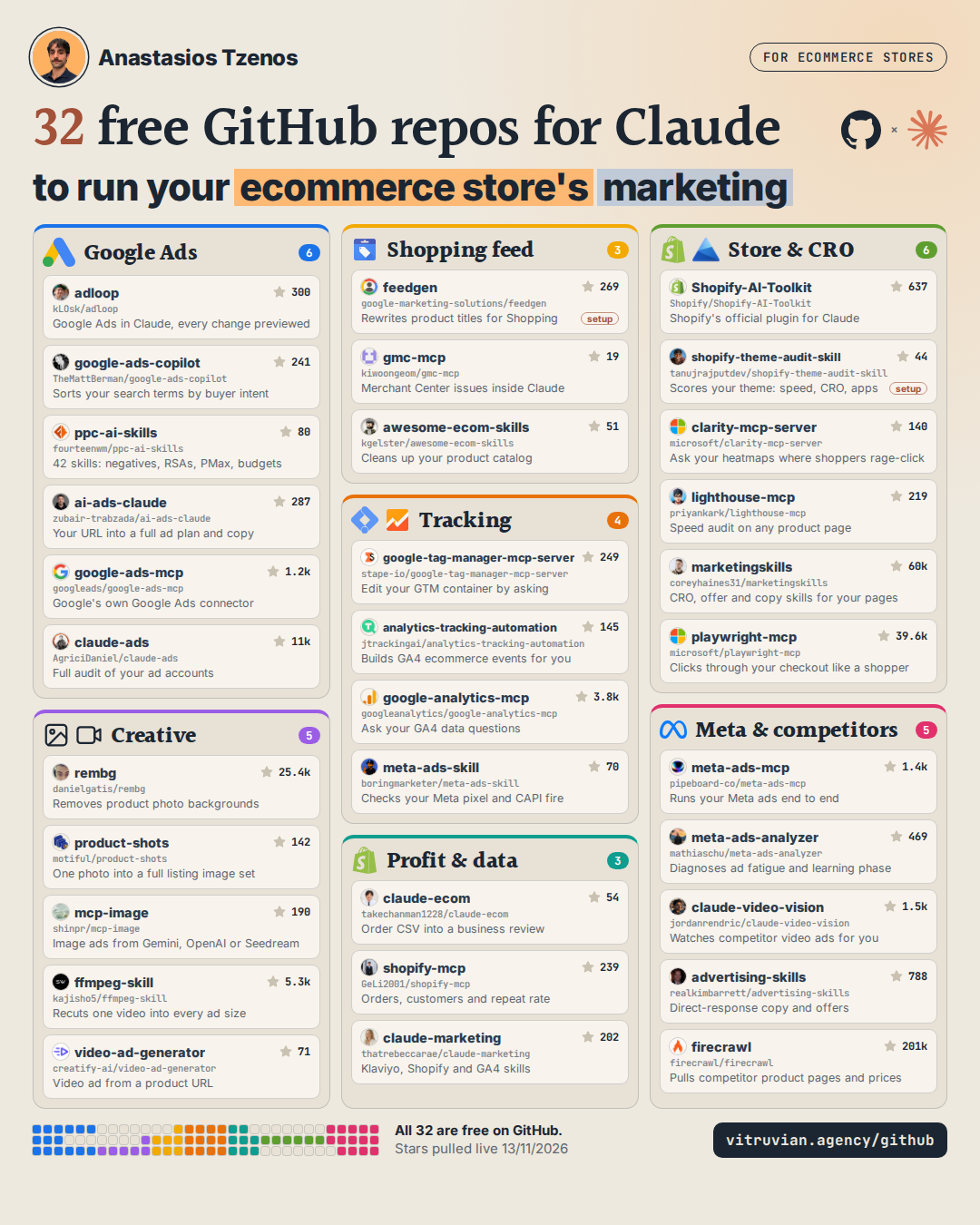
Every repo from my graphic, grouped by the job it does for an ecommerce store, with the link, the install line and the first thing to type into Claude. All 32 are free on GitHub. Some of the tools behind them need a login, an API key or credits, and I say which on each one.
 Anastasios Tzenos · Published 13 November 2026 · Stars checked 13 November 2026
What is inside
- How to install one
- Three to start with
- Google Ads (6)
- Shopping (3)
- Tracking (4)
- Store & CRO (6)
- Creative (5)
- Meta & competitors (5)
- Profit & data (3)
How to get a repo into Claude
You need Claude Code for these, which comes with a paid Claude plan. If you have never opened it, it is the Code tab in the Claude desktop app, or the claude command in your terminal. A few connectors are added in the Claude app instead, and I mark those below.
- Pick the board for the problem in front of you, like your feed, your tracking or your search terms.
- Pick one repo. One is enough to start, and the tags tell you if it needs an account or a key.
- Press COPY on its install line and paste it into Claude Code. If there are two lines, paste them in order.
- If it asks you to log in to Google, Shopify or Meta, do it once. Claude keeps the connection.
- Press COPY on the first prompt and paste it in. If Claude does not use the tool, name it in your message.
What the tags mean
Instructions Claude loads when the job comes up. No account needed unless the note says so.
Connects Claude to a live account (Google Ads, Shopify, GTM). You log in once.
A bundle of skills and connectors installed in one go from Claude Code.
Runs on your computer and Claude calls it when needed.
Takes more than one line. I kept these two in because nothing else does the job as well.
Three to start with
If you only try three, try these. None of them asks you to connect an ad account or get an API key, so you can see what Claude does with them in ten minutes.
- ppc-ai-skills to sort your search terms and find the ones spending without selling.
- claude-ecom to turn an order export from your store into a monthly review.
- ai-ads-claude to turn your store's URL into a full ad plan with the copy written.

Google Ads
6The work I did every day on Google's side: reading search terms, adding negatives, fixing ads and checking budgets. These put that work inside Claude.

Reads and edits Google Ads and GA4, previews every change
adloop init walks you through the Google login, then prints the exact line that adds it to Claude Code on your computer. Or skip the install and use their free cloud plan.

Audits search terms, drafts negatives and budget moves

Google Ads safety rules, diagnostics and dead-keyword scanner
Pick the skills you want when it asks. Start with mutation-safety, which stops Claude changing a live account without your yes.

Full ad strategy, keywords and copy from your store URL

Google's own Google Ads connector, reads your account
This line uses Claude Code's standard add command. The repo's README only shows a config file. It reads your account; pair it with adloop if you want Claude to make changes.

Full audit of your ad accounts, Google and Meta included

Shopping
3Your product feed is your Shopping ad. The title, the image and the price are what people see, so this is where small fixes move the most.

Rewrites Shopping feed titles and descriptions with Gemini
FeedGen runs in Google Sheets with Gemini, not inside Claude. Claude Code can walk you through the setup if you paste in the README.

Finds Merchant Center disapprovals and drafts fixes and appeals

Shopify catalogue clean-up: taxonomy, SEO, alt text, redirects


Tracking
4If Google cannot see the sale, it cannot learn from it. Start here if you are not sure your conversions are real.

Reads and edits your Google Tag Manager tags

Plans and builds GA4 + GTM tracking for your store

Google's official GA4 connector, ask your data in plain English

Meta API setup, paused campaign builds and pixel checks


Store & CRO
6Paid clicks land on your store, so a slow page or a confusing product page costs you on every single click.

Shopify's official plugin: docs, API, store management
By default it sends usage data, including your latest prompt, to Shopify. Set OPT_OUT_INSTRUMENTATION=true to turn that off.

Scored speed, CRO, SEO and app-bloat audit of your theme

Asks Clarity about rage clicks, sessions and page behaviour
This line uses Claude Code's standard add command. The repo's README only shows a config file. The token is in your Clarity project settings.

Runs Lighthouse speed and SEO audits on any page
This line uses Claude Code's standard add command. The repo's README only shows a config file. Needs Chrome installed.

CRO, pricing, offer and copy skills for your pages
Claude opens your store and clicks through checkout like a shopper
Creative
5Product photos, image ads and video cuts for Performance Max and Meta, without booking a shoot for every test.

Removes backgrounds from product photos, in bulk, offline

Turns one product photo into listing, ad and social images

Generates and edits images with Gemini or OpenAI

Cuts, resizes and captions your videos for each platform

Video ad hooks, scripts and formats; optional auto-render

Meta & competitors
5Meta is the second channel. These run and diagnose your Meta ads, and let Claude look at what competitors are running and selling.

Runs and analyses your Meta ads from Claude
This one is added in the Claude app as a custom connector, not in Claude Code.

Explains why Meta results changed, using Meta's own rules

Lets Claude watch videos, including competitor ads

Copywriting, offer and angle skills for paid social

Pulls competitor product pages, prices and offers into clean data
Restart Claude Code after installing. If you prefer the connector version, the firecrawl-mcp-server repo has it.
Profit & data
3Revenue is not profit. These read your orders and your data so you can see what the ads actually paid for.

Turns your orders CSV into a business review

Reads and updates Shopify products, orders and customers

56 marketing skills: ads audits, Klaviyo, Shopify, GA4
Want someone to read your account first?
I spent three years on Google's side of Google Ads, and these tools came out of the same problems I saw in those accounts. If you run an ecommerce store and want me to look at yours before you install anything, I will do a free audit myself.
Request a free auditStar counts were pulled from GitHub on 13 November 2026. Repos change, so if an install line stops working, the repo's own README has the latest version. None of these projects is mine and none of them pays me to be here.